If you are a Sheridan student enrolled in a program at CCTT (Fort Erie Campus), please visit the Sheridan at CCTT page for more details regarding your schedule.
| Schedule Details |
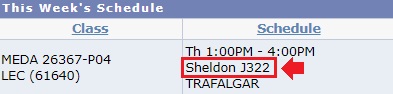
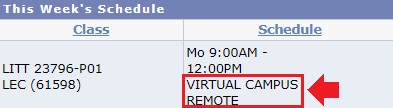
Course delivery details are available in your schedule posted to myStudent Centre:
|
The Spring / Summer 2024 term will run:
14-week schedule duration |
7A session duration |
7B session duration |
|
Spring / Summer Term 2024 Postsecondary |
May 6 - Aug. 16, 2024 |
May 6 - Jun. 21, 2024 |
Jul. 2 - Aug. 16, 2024 |
Spring / Summer 2024 enrolment and registration schedule
Spring / Summer 2024 Program Search
Enter your program name or code to see the type of schedule and elective associated with your program, as well as any important messages from your faculty.
| Program Name | Code | Schedule Type | Elective Type | Faculty Information |
| Advanced Manufacturing Management | PMFMT | Assigned Schedule | ||
| Advanced Special Effects Makeup, Prosthetics and Props | PASEM | Assigned Schedule | ||
| Advertising – Account Management | PADAM | Assigned Schedule | ||
| Advertising and Marketing Communications | PADMK | Assigned Schedule | General Education (GenEd) Electives | |
| Advertising and Marketing Communications – Management | PAMCM | Assigned Schedule | General Education (GenEd) Electives | |
| Animal Care | PANCR | Assigned Schedule | General Education (GenEd) Electives | |
| Architectural Technician | PATCN | Assigned Schedule | General Education (GenEd) Electives | |
| Architectural Technology | PARTY | Assigned Schedule | General Education (GenEd) Electives | |
| Art Fundamentals | PARTF | Assigned Schedule | General Education (GenEd) Electives | |
| Bachelor of Engineering (Electrical Engineering) | PBENE | Assigned Schedule | Breadth Electives | |
| Bachelor of Engineering (Mechanical Engineering) | PBENM | Assigned Schedule | Breadth Electives | |
| Business | PBUSS | Custom Schedule | General Education (GenEd) Electives | |
| Business Accounting | PBUSA | Custom Schedule | General Education (GenEd) Electives | |
| Business Administration – Accounting | PBSAA | Custom Schedule | General Education (GenEd) Electives | |
| Business Administration – Finance | PBAFI | Custom Schedule | General Education (GenEd) Electives | |
| Business Administration – Human Resources | PBAHR | Custom Schedule | General Education (GenEd) Electives | |
| Business Administration – Marketing | PBAMK | Custom Schedule | General Education (GenEd) Electives | |
| Business Analysis and Process Management | PBAPM | Assigned Schedule | ||
| Business Finance | PBUFI | Custom Schedule | General Education (GenEd) Electives | |
| Business Human Resources | PBUHR | Custom Schedule | General Education (GenEd) Electives | |
| Business Marketing | PBUMK | Custom Schedule | General Education (GenEd) Electives | |
| Chemical Engineering Technology | PCETY | Assigned Schedule | General Education (GenEd) Electives | |
| Chemical Engineering Technology – Environmental | PCETE | Assigned Schedule | General Education (GenEd) Electives | |
| Chemical Laboratory Technician | PCLTN | Assigned Schedule | General Education (GenEd) Electives | |
| Child and Youth Care | PCYCD | Assigned Schedule | General Education (GenEd) Electives | |
| Clinical Kinesiology | PCKNS | Assigned Schedule | ||
| Clinical Research | PCRSH | Assigned Schedule | ||
| Community and Justice Services | PCAJS | Assigned Schedule | General Education (GenEd) Electives | |
| Computer Animation | PCANM | Assigned Schedule | ||
| Computer Engineering Technician | PCPEN | Assigned Schedule | General Education (GenEd) Electives | |
| Computer Engineering Technology | PCPET | Assigned Schedule | General Education (GenEd) Electives | |
| Computer Programming | PCOMP | Custom Schedule | General Education (GenEd) Electives | |
| Computer Systems Technician – Information Technology Infrastructure and Services | PSITI | Assigned Schedule | General Education (GenEd) Electives | |
| Computer Systems Technician – Software Engineering | PCSSN | Custom Schedule | General Education (GenEd) Electives | |
| Computer Systems Technology – Information Systems Engineering | PSISE | Custom Schedule | General Education (GenEd) Electives | |
| Computer Systems Technology – Software Development and Network Engineering | PCSSC | Custom Schedule | ||
| Creative Industries Management | PCRIM | Assigned Schedule | ||
| Digital Creature Animation – Technical Direction | PCDCA | Assigned Schedule | ||
| Digital Product Design | PNMED | Assigned Schedule | ||
| Early Childhood Education, Level 101 | PECED | Assigned Schedule | General Education (GenEd) Electives | |
| Early Childhood Education, Level 102, 201, 202 | PECED | Assigned Schedule | General Education (GenEd) Electives | |
| Early Childhood Education – Intensive | PECEI | Assigned Schedule | General Education (GenEd) Electives | |
| Educational Support | PCESD | Custom Schedule | General Education (GenEd) Electives | |
| Electrical Engineering Technician | PETEN | Assigned Schedule | General Education (GenEd) Electives | |
| Electrical Techniques | PETEQ | Assigned Schedule | General Education (GenEd) Electives | |
| Electromechanical Engineering Technician | PELTN | Assigned Schedule | General Education (GenEd) Electives | |
| Electromechanical Engineering Technology | PEMTY | Assigned Schedule | General Education (GenEd) Electives | |
| Electronics Engineering Technician | PEETN | Assigned Schedule | General Education (GenEd) Electives | |
| Electronics Engineering Technology | PELTY | Assigned Schedule | General Education (GenEd) Electives | |
| English Language Studies (ESL) | PGASE | Assigned Schedule | General Education (GenEd) Electives | Welcome Letter |
| Environmental Control | PENCT | Assigned Schedule | Welcome Letter | |
| Environmental Technician | PENST | Assigned Schedule | General Education (GenEd) Electives | |
| Game Development – Advanced Programming | PGDAP | Assigned Schedule | ||
| Game Level Design | PGLDS | Assigned Schedule | ||
| General Arts & Science – University Profile | PGASU | Assigned Schedule | General Education (GenEd) Electives | |
| Honours Bachelor of Science – Osteopathy | PBHSO | Assigned Schedule | Breadth Electives | |
| General Arts & Science – University Profile (Certificate) | PGAUC | Assigned Schedule | General Education (GenEd) Electives | |
| Honours Bachelor of Animation | PBAAA | Assigned Schedule | Breadth Electives | |
| Honours Bachelor of Applied Health Sciences – Athletic Therapy | PBAHS | Assigned Schedule | Breadth Electives | |
| Honours Bachelor of Business Administration (Accounting) | PBACC | Custom Schedule | Breadth Electives | |
| Honours Bachelor of Business Administration (Finance) | PBBAF | Custom Schedule | Breadth Electives | |
| Honours Bachelor of Business Administration (Human Resources Management) | PBHRM | Custom Schedule | Breadth Electives | |
| Honours Bachelor of Business Administration (Marketing Management) | PBBAM | Custom Schedule | Breadth Electives | |
| Honours Bachelor of Business Administration (Supply Chain Management) | PBSCM | Custom Schedule | Breadth Electives | |
| Honours Bachelor of Community Safety | PBCMS | Assigned Schedule | Breadth Electives | |
| Honours Bachelor of Computer Science | PBCPS | Assigned Schedule | Breadth Electives | |
| Honours Bachelor of Computer Science (Mobile Computing) | PBACS | Assigned Schedule | Breadth Electives | |
| Honours Bachelor of Craft and Design | PBCRD | Assigned Schedule | Breadth Electives | |
| Honours Bachelor of Creative Writing and Publishing | PBCWP | Assigned Schedule | Breadth Electives | |
| Honours Bachelor of Early Childhood Leadership | PBECL | Assigned Schedule | Breadth Electives | |
| Honours Bachelor of Experiential Design | PBXDN | Assigned Schedule | Breadth Electives | |
| Honours Bachelor of Film and Television | PBFTV | Assigned Schedule | Breadth Electives | |
| Honours Bachelor of Game Design | PBGDS | Assigned Schedule | Breadth Electives | |
| Honours Bachelor of Health Sciences – Kinesiology and Health Promotion | PBHSK | Assigned Schedule | Breadth Electives | |
| Honours Bachelor of Illustration | PBAAI | Assigned Schedule | Breadth Electives | |
| Honours Bachelor of Information Sciences (Cyber Security) | PBAIS | Assigned Schedule | Breadth Electives | |
| Honours Bachelor of Interaction Design | PBIDS | Assigned Schedule | Breadth Electives | |
| Honours Bachelor of Interior Design | PBAID | Assigned Schedule | Breadth Electives | |
| Honours Bachelor of Music Theatre Performance | PBAMT | Assigned Schedule | Breadth Electives | |
| Honours Bachelor of Photography | PBAAP | Assigned Schedule | Breadth Electives | |
| Honours Bachelor of Social and Community Development | PBSCD | Assigned Schedule | Breadth Electives | |
| Human Resources Management | PHRMC | Assigned Schedule | ||
| Interactive Media Management | PINME | Assigned Schedule | ||
| Interior Decorating | PINDE | Assigned Schedule | General Education (GenEd) Electives | |
| International Business Management | PINBM | Assigned Schedule | ||
| Internet Communications Technology | PICTE | Assigned Schedule | General Education (GenEd) Electives | |
| Internet of Things and Machine Intelligence | PIOTM | Assigned Schedule | ||
| Investigation – Public and Private | PIPAP | Assigned Schedule | General Education (GenEd) Electives | |
| Journalism | PJRNL | Assigned Schedule | General Education (GenEd) Electives | |
| Makeup for Media and Creative Arts | PMMCA | Assigned Schedule | General Education (GenEd) Electives | |
| Marketing Management | PMKMC | Assigned Schedule | ||
| Mechanical Engineering Technician | PMETN | Assigned Schedule | General Education (GenEd) Electives | |
| Mechanical Engineering Technician – Design | PMETD | Assigned Schedule | General Education (GenEd) Electives | |
| Mechanical Engineering Technology | PMETY | Assigned Schedule | General Education (GenEd) Electives | |
| Mechanical Engineering Technology – Design | PMEDD | Assigned Schedule | General Education (GenEd) Electives | |
| Mechanical Technician – Tool Making | PMTTM | Assigned Schedule | General Education (GenEd) Electives | |
| Mechanical Techniques – Tool and Die Maker | PMTTD | Assigned Schedule | General Education (GenEd) Electives | |
| Mechanical Techniques Plumbing | PLUMB | Assigned Schedule | General Education (GenEd) Electives | |
| Media Fundamentals | PMDAF | Assigned Schedule | General Education (GenEd) Electives | |
| Music Scoring for Screen and Stage | PMSVE | Assigned Schedule | ||
| Office Administration – Executive | POFAE | Assigned Schedule | General Education (GenEd) Electives | |
| Office Administration – Health Services | POAHS | Assigned Schedule | General Education (GenEd) Electives | |
| Paralegal | PARAL | Assigned Schedule | General Education (GenEd) Electives | |
| Performing Arts – Preparation | PPAPN | Assigned Schedule | General Education (GenEd) Electives | |
| Personal Support Worker | PPSWK | Assigned Schedule | General Education (GenEd) Electives | COVID Vaccination Requirement Letter |
| Pharmacy Technician | PPHTN | Assigned Schedule | General Education (GenEd) Electives | |
| Plumbing Technician | PLUMN | Assigned Schedule | General Education (GenEd) Electives | |
| Police Foundations | PPOLF | Assigned Schedule | General Education (GenEd) Electives | |
| Practical Nursing | PPNSG | Assigned Schedule | General Education (GenEd) Electives | COVID Vaccination Requirement Letter |
| Pre-Health Sciences Pathway to Advanced Diplomas and Degrees | PPHSS | Assigned Schedule | General Education (GenEd) Electives | |
| Professional Accounting | PPACG | Assigned Schedule | ||
| Project Management | PPRJM | Assigned Schedule | Welcome Letter | |
| Public Relations – Corporate Communications | PPRCC | Assigned Schedule | ||
| Quality Assurance – Manufacturing and Management | PQUAS | Assigned Schedule | ||
| Regulatory Affairs | PRGAF | Assigned Schedule | ||
| Social Service Worker | PSSWK | Assigned Schedule | General Education (GenEd) Electives | |
| Social Service Worker – Gerontology | PSSWG | Assigned Schedule | General Education (GenEd) Electives | |
| Teaching English to Speakers of Other Languages (TESOL Plus) | PTESL | Assigned Schedule | ||
| Technical Production for the Performing Arts Industry | PTPPA | Assigned Schedule | General Education (GenEd) Electives | |
| Technology Fundamentals | PTECH | Assigned Schedule | General Education (GenEd) Electives | |
| Urban Design | PURBN | Assigned Schedule | ||
| Veterinary Technician | PVETT | Assigned Schedule | General Education (GenEd) Electives | |
| Visual and Creative Arts | PCVAT | Assigned Schedule | General Education (GenEd) Electives | |
| Visual and Creative Arts – Advanced | PCVAD | Assigned Schedule | General Education (GenEd) Electives | |
| Visual Effects | PVEFF | Assigned Schedule | ||
| Visual Merchandising Arts | PVMAS | Assigned Schedule | General Education (GenEd) Electives | |
| Welding and Fabrication Technician | PWLFT | Assigned Schedule | General Education (GenEd) Electives | |
| Welding Techniques | PWLDT | Assigned Schedule | General Education (GenEd) Electives |
Check Your Academic Requirements
Check your Academic Requirements report before creating or editing your schedule. This will make sure you're on track to satisfy your Program Requirements and graduate as well as speeding up the enrolment process.
Choose your Electives
Depending on your program, you will either enrol in a General Elective, a Program Elective or a Breadth Elective. Space is limited in elective classes and available on a first come, first served basis - so it is strongly recommended that you enrol in your elective as soon as possible. Click here for elective information.
Timetable Assistance Presentations
Need help adding, swapping, or dropping your courses? Please view the following presentations:
Text Resize


High Contrast

